Should Your AI Coding Agent Run on a VPS or Your Mac?
Choose where an AI coding agent should run by separating interactive development, always-on orchestration, and heavy build workloads.
Table of Contents11 sections
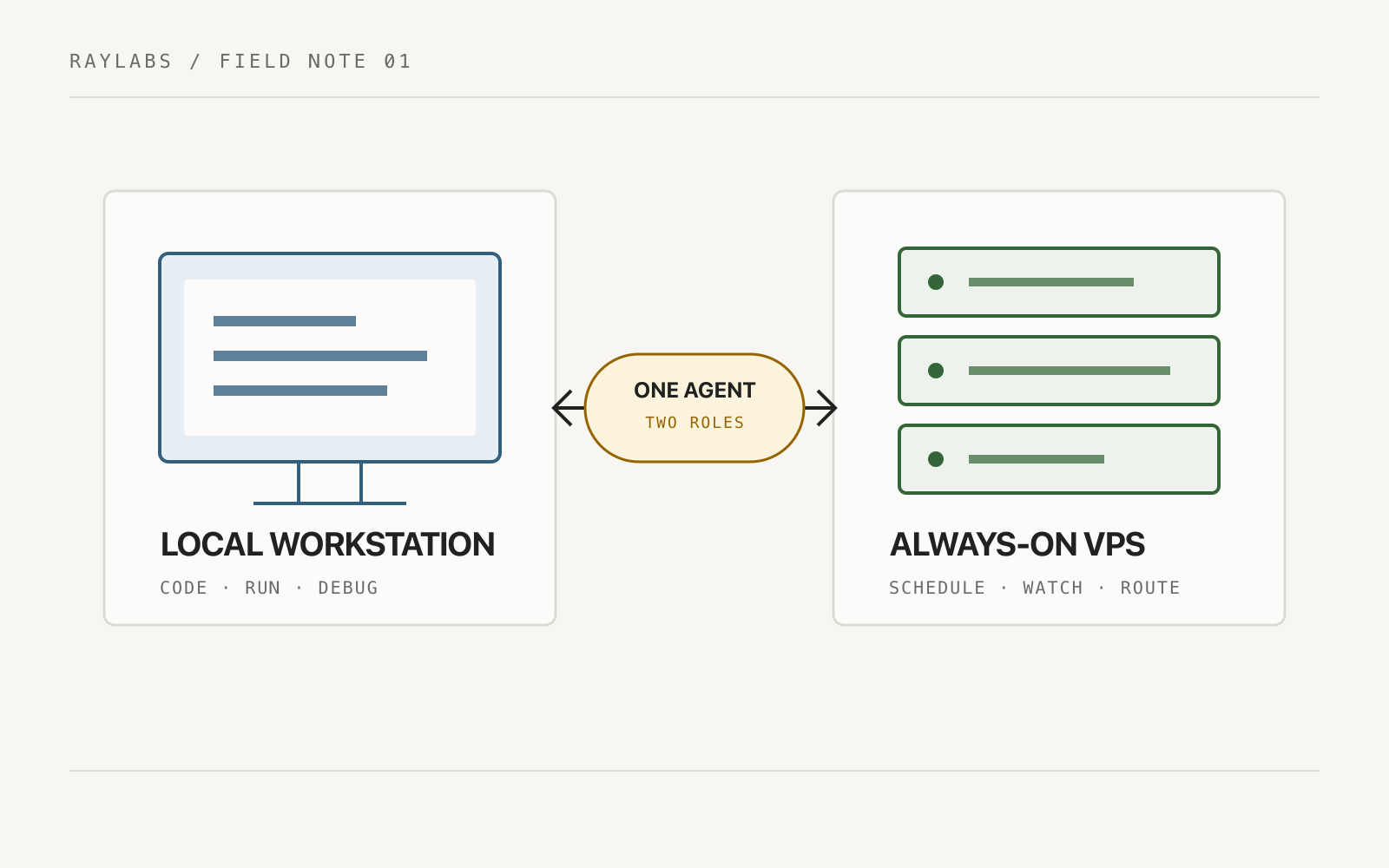
Once an AI coding agent becomes useful enough, a surprisingly practical question appears:
Where should it actually live?
On the laptop you already use every day? Or on a VPS that stays online 24/7?
At first this sounds like an infrastructure question. In practice, it is really a question about what kind of agent you are building.
A coding assistant that helps while you are sitting at your Mac has very different infrastructure needs from an autonomous agent expected to monitor repositories, run scheduled jobs, build software, and react while your laptop is asleep.
The useful distinction is not simply Mac versus VPS.
It is:
interactive workstation agent versus always-on automation agent.
That same separation of implementation and oversight matters once an agent can change code. See the multi-agent review pipeline for AI coding agents for a practical approval pattern.
First: Separate AI Work From Computer Work
One source of confusion with coding agents is that an agent can appear to be “working” for several minutes while a build is running.
But not every second of that process requires an AI model.
Consider an Android workflow:
Agent decides to run tests
        ↓
./gradlew test
        ↓
CPU executes Gradle, Kotlin compiler, tests
        ↓
Command finishes
        ↓
Agent reads the result
        ↓
Model decides what to do next
The expensive reasoning happens around the command: deciding what to run, interpreting output, modifying code, and deciding the next action.
The actual Gradle compilation is ordinary compute happening on the machine.
This distinction matters because moving an agent to a VPS does not magically reduce model usage. It changes where the non-AI computation and orchestration happen.
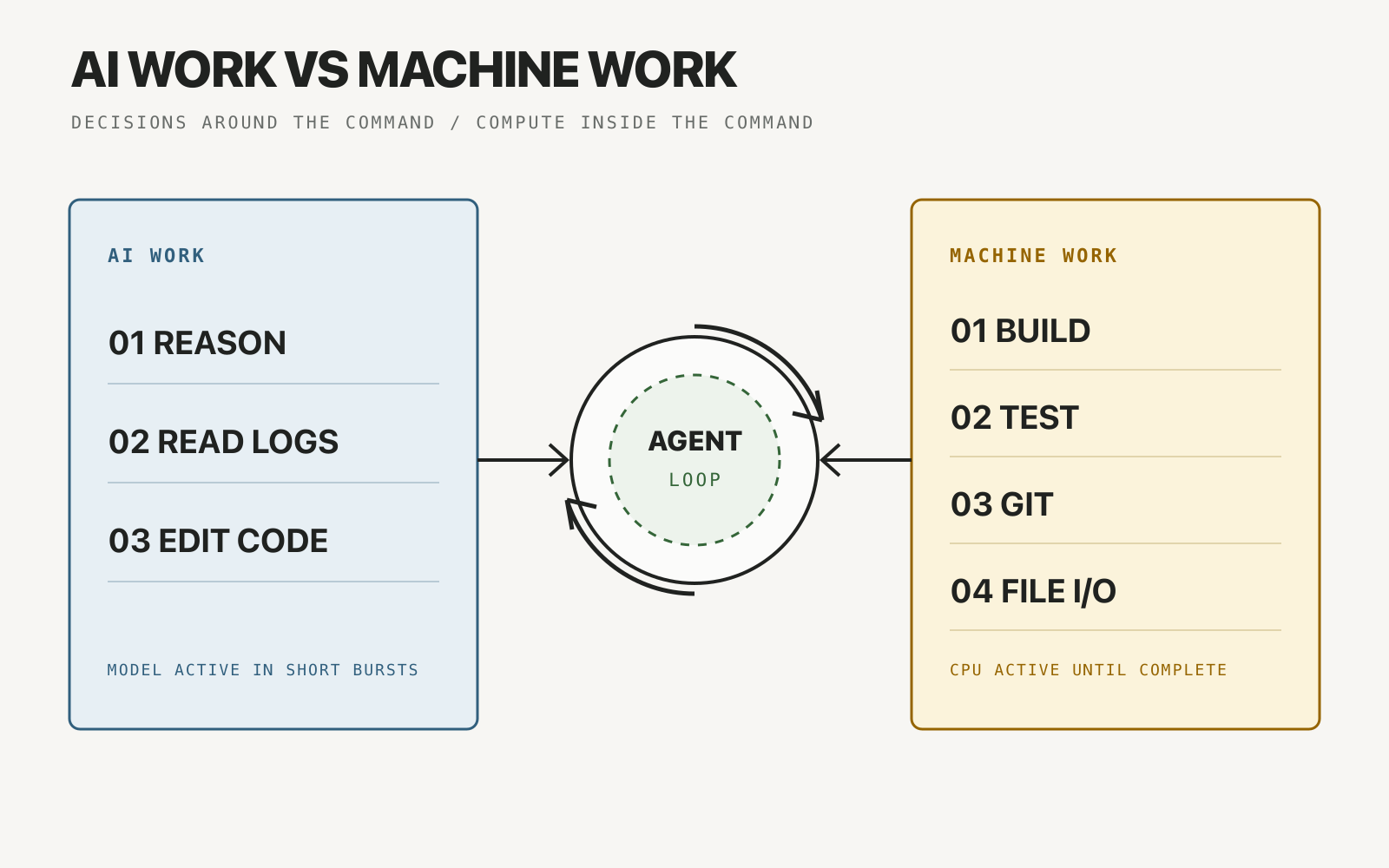
A working view of Should Your AI Coding Agent Run on a VPS or Your Mac: The agent loop connects AI reasoning, log reading, and code editing with machine-run builds, tests, Git, and file operations.
Option 1: Run the Agent on Your Mac
For a developer-focused agent, the Mac has a huge advantage: the environment already exists.
Your repositories are there. Your Android SDK is configured. Gradle caches are warm. Signing configuration may already exist. Emulators and physical devices can be attached. Your IDE and debugging tools are available.
The architecture is almost trivial:
You
 ↓
AI Agent
 ↓
Local Repository
 ↓
Gradle / Android SDK / Git
 ↓
Your Mac
This makes local execution excellent for interactive development.
You can ask the agent to inspect a bug, modify several files, run tests, build an APK, and then immediately continue working from the same checkout.
There is also less infrastructure to maintain. No server provisioning, SSH hardening, remote secrets management, or persistent storage strategy is required just to get started.
Where the Mac Starts to Hurt
The problem appears when the agent is expected to become independent.
If the Mac sleeps, the agent stops.
If the laptop travels with you, network availability changes.
If a long automation runs while you need the machine for something else, both workloads compete for CPU and memory.
And keeping a personal laptop permanently awake and plugged in just to host an agent is usually an awkward substitute for actual server infrastructure.
The Mac is therefore excellent when the agent behaves like a developer tool.
It becomes less attractive when the agent behaves like a service.
Option 2: Put Everything on a VPS
A VPS changes the mental model.
Instead of the agent being something you launch while working, it becomes infrastructure that happens to contain an AI agent.
Telegram / Web / CLI
        ↓
Agent Service
        ↓
Scheduler / Queue
        ↓
Git Repositories
        ↓
Build & Automation Tools
        ↓
VPS
Now the agent can remain online even when your laptop is closed.
That makes a VPS much more suitable for tasks such as:
- scheduled repository checks,
- content pipelines,
- background research,
- issue triage,
- automated pull-request preparation,
- periodic reports,
- lightweight builds and tests,
- webhook-driven workflows.
This is where the idea of a personal “Jarvis” starts becoming technically realistic. The agent is no longer tied to the physical computer you happen to be using.
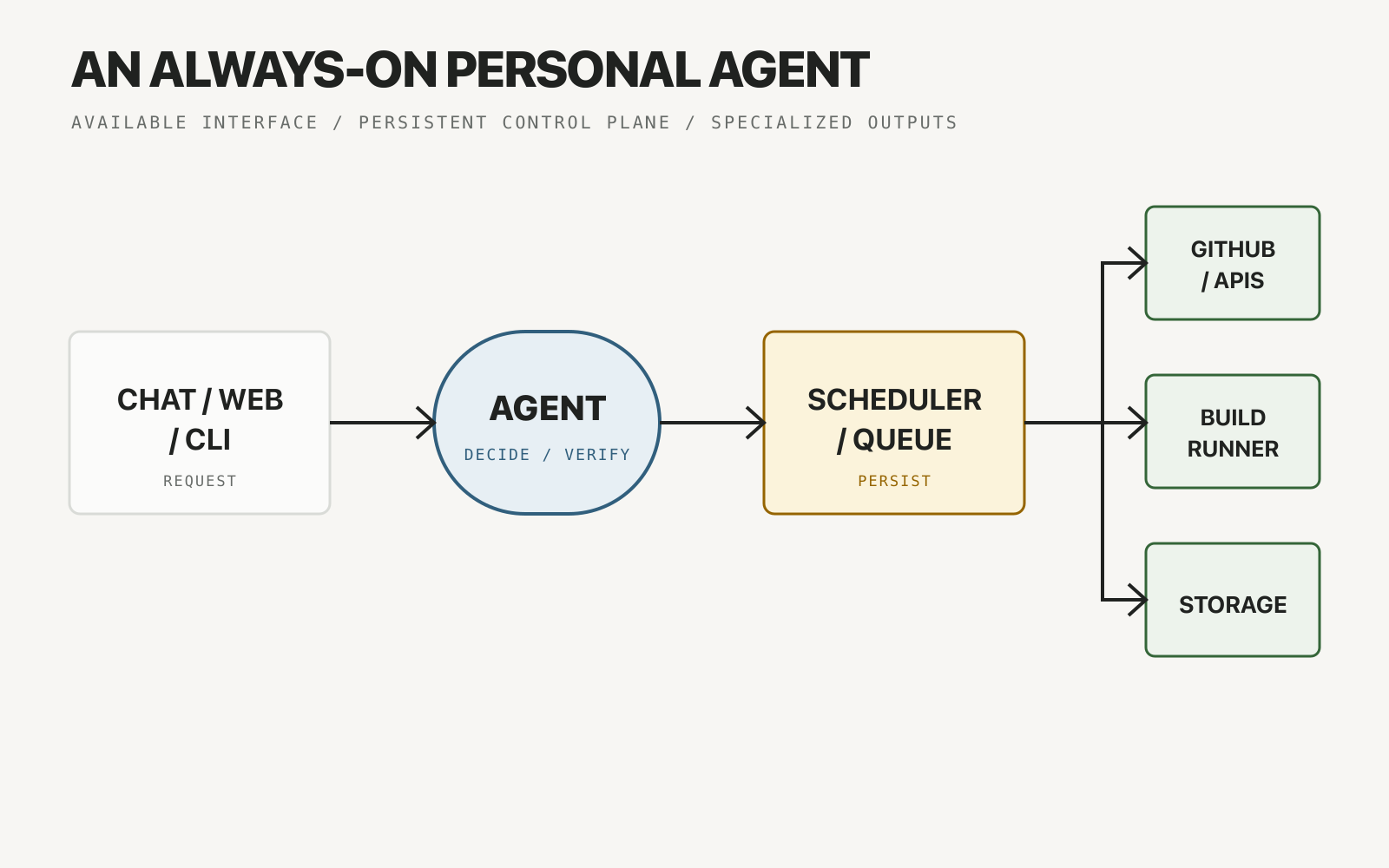
The VPS coordinates the loop while specialized systems perform the work.
But a VPS Is Not Automatically Better for Android
This is where the answer becomes more nuanced.
Android builds can be resource hungry.
Gradle likes memory. Dependency caches consume disk space. Android SDK components add more storage. Running emulators introduces another level of CPU and RAM requirements.
A tiny VPS that is perfectly adequate for a Node.js automation bot may become painfully slow when asked to build a large Android project.
So the question should not be:
Can Android compile on a VPS?
Of course it can.
The better question is:
Is paying for enough VPS compute better than using CI or my existing development machine?
For many projects, the answer is no.
This leads to a better architecture.
The Better Pattern: Separate the Brain From the Heavy Worker
An always-on agent does not need to personally execute every workload on the same server.
The VPS can act as the orchestrator.
Heavy jobs can run elsewhere.
                    ┌→ GitHub API
                    │
User → VPS Agent ───┼→ External APIs
                    │
                    ├→ CI Runner → Build / Test
                    │
                    └→ Mac Runner → Device-specific work
This design has several advantages.
The VPS can stay relatively small because it handles coordination, state, scheduling, and lightweight commands.
A CI service can perform reproducible builds.
Your Mac can remain available as a runner only for workflows that genuinely require your local environment or attached hardware.
The architecture becomes modular instead of forcing one machine to do everything.
This is essentially how larger automation systems are designed anyway: control plane and workers are separate concerns.
What I Would Put on Each Machine
A practical personal setup might look like this.
VPS: Always-On Brain
Run things that need availability rather than huge compute:
- agent runtime,
- scheduler,
- task queue,
- small database,
- webhook receiver,
- Telegram or web interface,
- Git operations,
- API integrations,
- lightweight scripts.
CI: Reproducible Worker
Use CI for jobs such as:
- unit tests,
- lint,
- static analysis,
- release builds,
- APK/AAB generation,
- coverage reports.
Mac: Development and Special Hardware
Keep local execution for:
- interactive coding,
- emulator testing,
- physical Android devices,
- UI debugging,
- tasks requiring local credentials or tooling,
- anything where immediate developer feedback matters.
This gives the agent independence without turning a VPS into an unnecessarily expensive workstation in the cloud.
VPS vs Mac: The Decision Is Mostly About Availability
A simple decision matrix helps.
| Requirement | Mac | VPS |
|---|---|---|
| Interactive coding | Excellent | Possible |
| Existing dev environment | Excellent | Needs setup |
| Always online | Weak | Excellent |
| Scheduled automation | Depends on uptime | Excellent |
| Android emulator | Excellent | Usually inefficient |
| Lightweight API automation | Good | Excellent |
| No infrastructure maintenance | Excellent | Weak |
| Remote access from anywhere | Possible | Excellent |
The interesting part is that neither side wins every category.
That is why a hybrid system usually becomes attractive once the agent grows beyond experimentation.
Start Local, Move the Control Plane Later
It is tempting to design the perfect autonomous-agent infrastructure before the agent actually does anything valuable.
I would avoid that.
Start with the Mac.
Prove that the workflow is useful.
Identify which tasks you repeatedly ask the agent to perform.
Then ask a very specific question:
Which of these tasks should continue running when my laptop is closed?
Those are the first candidates to move to a VPS.
A sensible evolution looks like this:
Stage 1
Mac-only agent

        ↓

Stage 2
VPS agent + GitHub/API integrations

        ↓

Stage 3
VPS orchestrator + CI workers

        ↓

Stage 4
VPS orchestrator + CI + optional local runners
Infrastructure should follow demonstrated needs, not imagined ones.
The Real Goal Is Not an Always-On Computer
When people say they want their own AI agent, the first instinct is often to think about models, VPS providers, RAM, or tokens.
But the machine is not the interesting part.
The interesting part is whether the system can reliably complete a loop:
Observe
  ↓
Reason
  ↓
Act
  ↓
Verify
  ↓
Remember
  ↓
Repeat
A laptop can run that loop.
A VPS can run that loop.
A distributed system can run that loop.
The right infrastructure depends on how independent that loop needs to be.
For an AI pair programmer, I would keep it close to the development environment.
For an agent expected to work while I am away, I would move the orchestration layer to an always-on server and let specialized workers handle the heavy jobs.
That is a much more scalable path than simply leaving a laptop plugged in forever.
Final Takeaway
The choice between a VPS and a Mac is not really about which computer is “better” for AI.
It is about the role of the agent.
If the agent is something you use, local execution is simple and powerful.
If the agent is something you expect to operate independently, an always-on environment becomes increasingly important.
And if the agent needs both autonomy and heavy development workloads, the best answer is often neither Mac-only nor VPS-only.
It is a small distributed system:
VPS for orchestration. CI for repeatable compute. Local machines for workloads that genuinely belong there.
That is when a personal AI agent starts looking less like a chatbot running commands and more like actual developer infrastructure.
Continue Exploring
You Might Also Like

Agent sparse worktree blindness in monorepo workflows
Discover how to prevent AI coding agents in Git sparse-checkout worktrees from missing out-of-cone callers and breaking monorepo trunk builds.
Fail-Closed Verification Gates for AI Agents
Learn how to build true fail-closed verification gates in multi-agent pipelines to quarantine defective drafts and prevent expensive retry loops.

Separate Validation and Review Repair Budgets
Learn how separate builder and reviewer retry budgets prevent early validation errors from blocking qualitative editorial repairs in automated AI workflows.